
Impact Guru
Quality & Performance Dashboard Toolkit | KPI Monitoring, Governance Assurance & Improvement Planning
Quality & Performance Dashboard Toolkit | KPI Monitoring, Governance Assurance & Improvement Planning
Couldn't load pickup availability
Quality & Performance Dashboard Toolkit — Version 1.0
A practical, self-configurable quality monitoring, performance intelligence and governance assurance toolkit for adult social care providers in England.
Effective quality assurance requires more than collecting performance figures, completing audits or presenting red, amber and green ratings. Providers need reliable information that helps managers understand what is happening across services, identify emerging risks, challenge inconsistent performance and demonstrate whether improvement actions are producing meaningful results.
Quality dashboards can strengthen leadership oversight, support CQC inspection readiness, inform commissioner discussions and improve operational decision-making. However, poorly designed dashboards can create false assurance when indicators are unreliable, thresholds are inappropriate or important risks are hidden within overall performance scores.
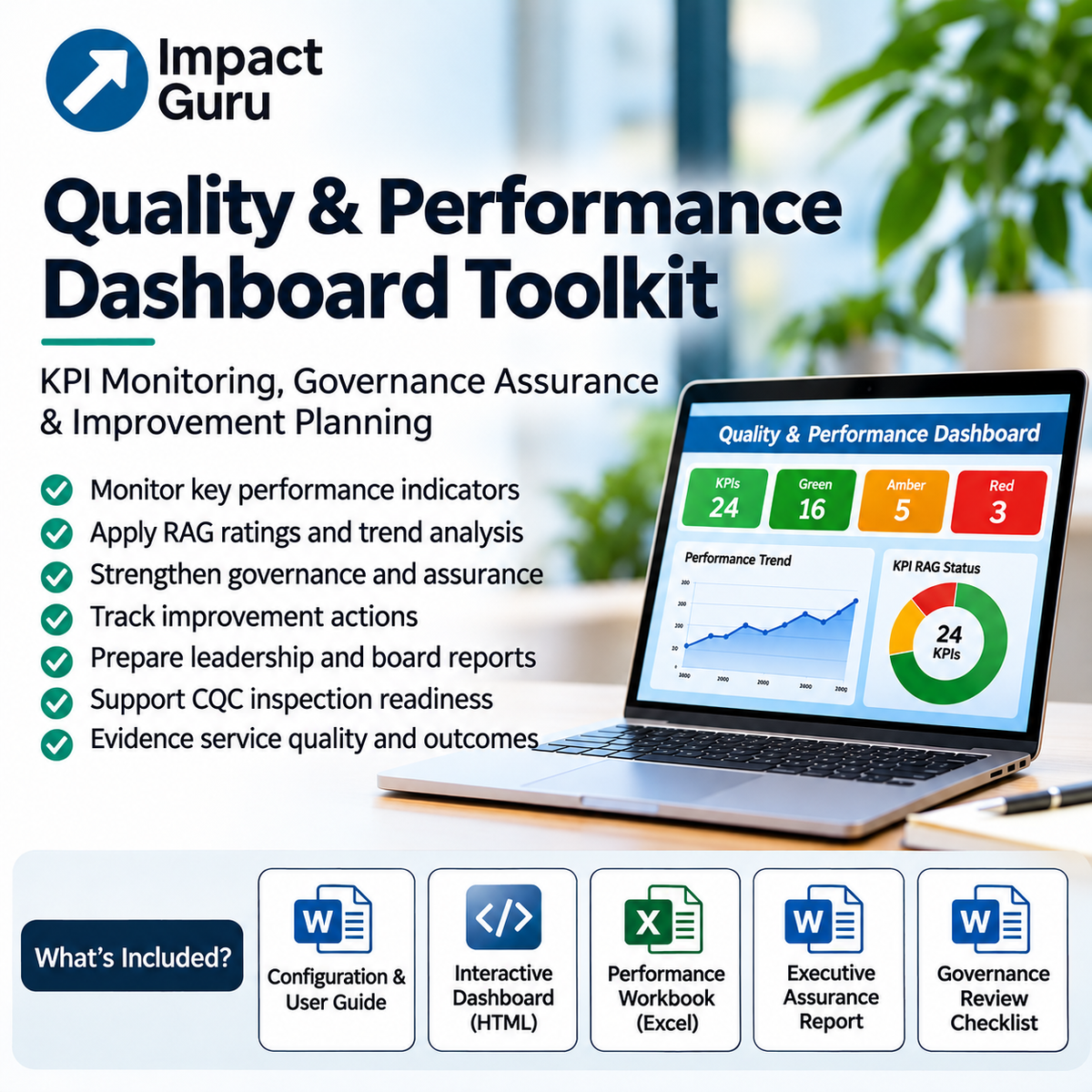
The Impact Guru Quality & Performance Dashboard Toolkit — Version 1.0 provides a connected set of professional resources for establishing performance indicators, reviewing quality trends, recording governance concerns, managing improvement actions and preparing structured assurance reports.
Combining an interactive HTML/JavaScript dashboard with an editable Microsoft Excel assurance workbook and professionally formatted Word documents, the toolkit helps organisations move from performance monitoring to evidence-led governance, accountable improvement and demonstrable quality assurance.
It is designed for repeated use across operational management, quality meetings, senior leadership reviews and board reporting.
What Can the Toolkit Help You Achieve?
The toolkit provides a structured approach to monitoring service quality and connecting performance information with management decisions and improvement activity.
- Establish meaningful quality KPIs: Develop a consistent set of indicators covering safety, safeguarding, care planning, workforce, outcomes, governance and service resilience.
- Monitor performance: Record results, review trends and identify areas requiring management attention.
- Apply RAG indicators: Use configurable performance thresholds to distinguish satisfactory performance from emerging concerns and significant exceptions.
- Strengthen data confidence: Consider the reliability, completeness and relevance of the information supporting dashboard conclusions.
- Improve governance reporting: Present quality information in a structured format suitable for Registered Managers, senior leaders, directors and trustees.
- Identify recurring risks: Connect incidents, complaints, audits, workforce pressures and performance concerns.
- Track improvement actions: Record accountable owners, deadlines, progress and evidence of completion.
- Support commissioner assurance: Organise quality and performance information for contract monitoring and service review discussions.
- Strengthen inspection readiness: Maintain clearer evidence of governance oversight, quality monitoring and improvement activity.
- Demonstrate improvement: Move beyond reporting activity to evaluating whether interventions have improved practice and outcomes.
The emphasis is on connecting quality intelligence, professional judgement, leadership accountability, service-user outcomes and continuous improvement.
What's Included in Your Download?
Version 1.0 is supplied as a single downloadable ZIP archive containing five professional toolkit files.
The package includes:
- One comprehensive Configuration & User Guide in Microsoft Word format.
- One interactive HTML/JavaScript Quality & Performance Dashboard.
- One editable Microsoft Excel Quality & Performance Assurance Workbook containing nine worksheets.
- One editable Executive Quality & Performance Assurance Report in Microsoft Word format.
- One editable Quality Governance Review Checklist in Microsoft Word format.
The files are numbered in their recommended order of use. Each component supports a different stage of the quality monitoring and governance process.
1. Configuration & User Guide
A professionally formatted guide explaining the toolkit's purpose, structure, configuration requirements and recommended operating arrangements.
The guide supports users in understanding how the interactive dashboard, Excel workbook and Word reporting documents work together.
It explains the importance of selecting relevant indicators, configuring targets, interpreting RAG ratings, reviewing evidence confidence and using dashboard findings within management and governance meetings.
The Configuration & User Guide is File 01 and should be read before using the other toolkit components.
2. Interactive Quality & Performance Dashboard
An interactive HTML/JavaScript dashboard that can be opened locally in a compatible modern desktop web browser without requiring a separate online account.
The dashboard provides a practical environment for entering and reviewing quality and performance information.
Key capabilities include:
- Twenty-four quality and performance indicators.
- Structured KPI recording and monitoring.
- Red, amber and green performance indicators.
- Governance review questions and assurance prompts.
- Identification of indicators requiring management attention.
- CSV export for further analysis.
- Printable dashboard reporting, which can be saved as a PDF through the browser's print function.
The dashboard is intended to support internal management review. Performance ratings depend on the data and thresholds entered by users and should be interpreted alongside professional judgement and service context.
3. Quality & Performance Assurance Workbook
A professionally formatted, editable Microsoft Excel workbook providing a more detailed environment for quality monitoring, performance analysis and governance assurance.
The workbook contains nine worksheets covering connected elements of quality and performance management.
Its features include:
- Structured KPI and performance recording tables.
- Configurable performance targets and thresholds.
- Automated calculations and performance indicators.
- Executive dashboard information.
- Monthly performance data recording.
- Trend monitoring and chart presentation.
- Risk and exception reporting.
- Improvement action tracking.
- Governance review information.
Tables are professionally formatted with visible borders, structured headings and clear recording fields to support practical use.
The workbook enables managers to consolidate performance information and identify where further investigation, escalation or improvement may be required.
Important: Any illustrative targets or thresholds supplied within the workbook must be reviewed and adapted to the organisation's services, risks, contractual requirements and governance arrangements. They are not universal CQC performance standards.
4. Executive Quality & Performance Assurance Report
A professionally formatted, editable Microsoft Word report for presenting quality and performance findings to senior leadership teams, directors, boards, trustees and governance committees.
The report provides structured tables and reporting sections for:
- Executive quality and performance summaries.
- Key performance indicators and assurance findings.
- Significant risks, exceptions and emerging concerns.
- Performance trends and areas requiring management attention.
- Governance commentary and evidence confidence.
- Priority improvement actions.
- Management decisions and accountability.
- Review and sign-off arrangements.
The report helps organisations move beyond presenting numerical performance information by documenting what the findings mean, what decisions are required and how improvement will be monitored.
5. Quality Governance Review Checklist
An editable Microsoft Word checklist designed to support structured quality and governance meetings.
The document includes bordered review tables, interactive checkbox controls and decision-tracking fields.
It can be used to examine whether quality information has been reviewed appropriately, whether significant concerns have been escalated and whether management actions have clear accountability.
The checklist supports a consistent approach to recording governance scrutiny and identifying areas requiring further assurance.
Quality and Performance Monitoring Domains
The toolkit is informed by the twelve quality domains used within the free Impact Guru Quality Dashboard Builder.
- Safety and Risk: Safety incidents, recurring risks, risk assessment and escalation.
- Safeguarding and Protection: Safeguarding concerns, referral timeliness, learning and outstanding actions.
- Incidents and Learning: Incident trends, investigations, root causes and evidence of improvement.
- Complaints and Feedback: Complaints, compliments, response times, recurring themes and learning.
- Care Planning and Reviews: Care plan accuracy, review timeliness, risk assessments and involvement of people receiving support.
- Medication and Clinical Risk: Medication errors, MAR audits, delegated tasks and clinical escalation.
- Workforce and Supervision: Supervision, staffing pressures, continuity, sickness and turnover.
- Training and Competence: Training compliance, practical competency and workforce development.
- Outcomes and Quality of Life: Personal outcomes, independence, participation, feedback and quality-of-life evidence.
- CQC and Regulatory Readiness: Regulatory actions, inspection evidence, notifications and governance assurance.
- Digital Records and Data Quality: Record completeness, data accuracy, reporting reliability and information governance.
- Business Continuity and Service Resilience: Continuity planning, emergency preparedness, service disruption and recovery.
These domains provide a broad framework for quality monitoring. Individual providers should select and configure indicators that reflect their services, contractual obligations, regulatory requirements and the needs of people receiving support.
From Performance Data to Meaningful Governance Assurance
One of the most common weaknesses in quality reporting is the gap between collecting information and demonstrating effective management oversight.
A provider may report that mandatory training compliance is high, care plan reviews are up to date and most quality audits have been completed. However, those figures do not necessarily demonstrate that staff are competent, care plans reflect current needs or audit findings have improved practice.
Effective governance requires managers to examine the relationship between reported performance, operational evidence and the experiences of people receiving support.
The toolkit encourages organisations to ask:
- Can we trust the data being reported?
- Are performance trends improving, deteriorating or remaining stable?
- Are there recurring concerns across incidents, complaints, audits and workforce information?
- Are green ratings supported by reliable evidence?
- Which red or amber indicators require escalation?
- Who is accountable for resolving identified weaknesses?
- Have previous actions produced measurable improvements?
- What additional assurance does the board or senior leadership team require?
A dashboard should support management challenge and decision-making, not simply provide reassurance through attractive charts and positive ratings.
Using RAG Ratings Responsibly
Red, amber and green indicators can help managers identify performance exceptions and focus attention on significant risks.
However, RAG ratings are only useful when the underlying thresholds are appropriate, consistently applied and supported by reliable evidence.
The toolkit supports a structured approach to configuring and interpreting performance indicators.
- Green: Performance meets the agreed threshold and there is no identified material assurance exception.
- Amber: Performance is below the expected level, a trend is deteriorating or further investigation is required.
- Red: Performance falls outside the agreed tolerance or a significant issue requires escalation and corrective action.
These are general management definitions. Organisations must determine appropriate thresholds for individual indicators and distinguish between numerical performance concerns and matters requiring immediate safeguarding, clinical, regulatory or operational escalation.
A serious safeguarding concern or other critical risk must never be treated as acceptable simply because the overall dashboard is green.
Who Is This Toolkit For?
The Quality & Performance Dashboard Toolkit is designed for professionals responsible for service quality, operational performance, governance and improvement across adult social care.
- Registered Managers and service managers.
- Adult social care provider directors and senior leaders.
- Quality assurance and compliance managers.
- Operations managers and regional managers.
- Safeguarding and risk leads.
- Board members and trustees.
- Commissioning and contract management professionals.
- Quality improvement and transformation leads.
- Independent health and social care consultants.
It is particularly relevant to organisations delivering supported living, learning disability and autism support, homecare, mental health services, older people's care, complex care and community-based support.
The resources can be adapted for individual services, multi-site providers and organisation-wide governance arrangements.
How the Toolkit Works
Step 1 — Read the Configuration & User Guide
Begin with File 01 to understand the toolkit's structure, configuration requirements, data expectations and recommended workflow.
Step 2 — Establish Your Quality Indicators
Select relevant performance measures and configure targets, reporting periods and responsibilities.
Consider the needs of people receiving support, service risks, commissioner requirements, CQC expectations and existing governance arrangements.
Step 3 — Record and Review Performance
Use the interactive dashboard and Excel workbook to enter performance information and examine results.
Review numerical indicators alongside audits, incidents, complaints, workforce information, feedback and other relevant evidence.
Step 4 — Identify Risks and Exceptions
Examine red and amber indicators, deteriorating trends, recurring concerns and data-quality weaknesses.
Identify matters requiring immediate escalation or further investigation.
Step 5 — Establish Improvement Actions
Record improvement priorities, responsible owners, deadlines and progress through the workbook's action-tracking arrangements.
Ensure that significant risks are linked to appropriate management oversight and escalation.
Step 6 — Prepare Governance Reporting
Use the Executive Quality & Performance Assurance Report to communicate the organisation's quality position, significant concerns, assurance limitations and management decisions.
Use the Quality Governance Review Checklist to support structured review and record the scrutiny applied.
Step 7 — Monitor Improvement and Repeat
Review performance regularly, evaluate the impact of completed actions and update governance reports as new information becomes available.
Use repeat reporting to identify whether improvements have been sustained or whether further intervention is necessary.
Designed for Practical, Repeated Use
The Quality & Performance Dashboard Toolkit is designed as a reusable professional management resource rather than a single-use assessment.
The HTML dashboard operates locally in a compatible browser, while the Excel workbook and Word documents can be edited to reflect organisational requirements.
Professionally formatted tables, clear recording fields, automated spreadsheet calculations and structured reporting sections support practical use within established management and governance processes.
The toolkit does not require a separate Impact Guru application subscription or ongoing online account for its core offline functions.
Important: Users are responsible for protecting working files, maintaining backups, managing access permissions and avoiding unnecessary inclusion of identifiable personal or sensitive information. The toolkit is not a secure hosted care-record system or evidence repository.
Free Quality Dashboard Builder or Professional Toolkit?
Impact Guru also provides a free online Quality Dashboard Builder to help adult social care organisations identify suitable quality domains, performance indicators, governance questions and improvement priorities.
The free resource is designed to help organisations establish a quality dashboard framework and consider what effective governance reporting should include.
The downloadable Quality & Performance Dashboard Toolkit serves a broader operational purpose.
It provides editable performance recording tools, an interactive KPI dashboard, a multi-worksheet Excel assurance workbook, structured action tracking and reusable governance reporting documents.
The free resource helps organisations design their approach to quality monitoring. The professional toolkit provides the working documents needed to record performance, review exceptions, manage improvement and report assurance findings.
Download Format and Technical Requirements
- Delivery: Digital download supplied as a ZIP archive.
- Version: 1.0.
- Package: Five files.
- File 01: Configuration & User Guide — editable DOCX.
- File 02: Interactive Quality & Performance Dashboard — HTML/JavaScript.
- File 03: Quality & Performance Assurance Workbook — editable XLSX containing nine worksheets.
- File 04: Executive Quality & Performance Assurance Report — editable DOCX.
- File 05: Quality Governance Review Checklist — editable DOCX.
- Internet connection: Not required for the core offline dashboard and document-editing functions.
- Account: No separate Impact Guru application account required.
- Recommended environment: Desktop or laptop computer with compatible Microsoft Office applications and a modern web browser.
- Updates: The toolkit does not automatically retrieve new CQC guidance, commissioner requirements or other regulatory changes.
This is a downloadable professional management toolkit, not a hosted software subscription, independent quality audit, CQC certification or bespoke consultancy engagement.
About Impact Guru
Impact Guru provides specialist bid strategy, tender writing, quality assurance and professional intelligence resources for organisations operating across adult social care and related public service sectors.
The Quality & Performance Dashboard Toolkit reflects an evidence-led approach to service monitoring, operational accountability, leadership oversight and continuous improvement.
Explore further guidance through the Impact Guru Quality Assurance Knowledge Hub.
Important Professional, Regulatory and Technical Disclaimer
The Quality & Performance Dashboard Toolkit is an independent professional management resource developed by Impact Guru Ltd.
It does not provide certification of CQC compliance, service quality, safeguarding effectiveness, contractual performance or organisational governance maturity.
Dashboard results, RAG ratings and performance indicators are internal management measures. Their reliability depends on the accuracy, completeness and interpretation of information entered by users, the appropriateness of configured thresholds and the quality of supporting evidence.
The toolkit does not replace professional judgement, safeguarding procedures, statutory notifications, commissioner reporting specifications, legal advice, information governance requirements, independent audit or specialist quality assurance.
Users must consider the legislation, regulatory expectations, sector guidance and contractual obligations applicable to their own services. These requirements may change over time.
The toolkit does not automatically update when standards, legislation or regulatory guidance change.
Digital product: Please review the product description, technical requirements and applicable digital-product terms before purchasing.
Share