
Impact Guru
Bid / No-Bid & Tender Triage Toolkit – Self-Configurable Digital Download
Bid / No-Bid & Tender Triage Toolkit – Self-Configurable Digital Download
Couldn't load pickup availability
Make better Bid / No-Bid decisions. Focus your bidding resources on suitable opportunities, identify risks earlier and document decisions consistently.
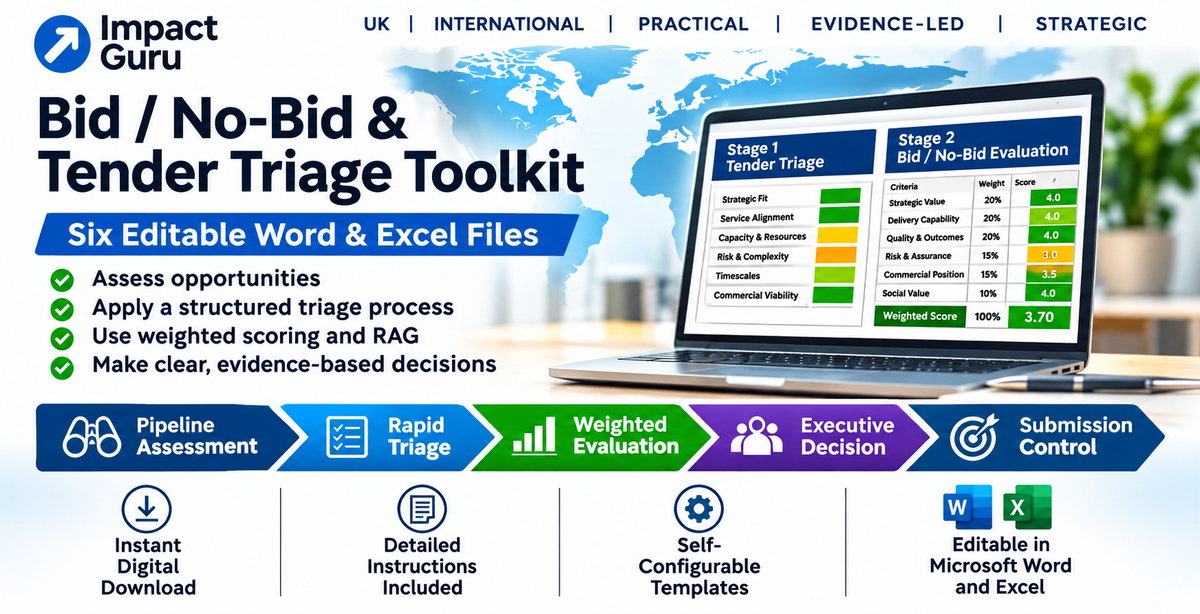
Not every tender is right for every organisation. Impact Guru's Self-Configurable Bid / No-Bid & Tender Triage Toolkit gives your team a practical, reusable framework for assessing opportunities before and after tender publication.
Developed by Mike Harrison, founder of Impact Guru Ltd, drawing on more than 20 years of experience in adult social care, commissioning, bid strategy and service development, the toolkit combines structured Word forms with two Excel decision-support workbooks.
One-off purchase · Six editable professional files · Automatic digital delivery
Download the complete toolkit after purchase. Detailed step-by-step instructions are included, allowing your organisation to configure and use the tools independently.
No initial consultation, organisational questionnaire or waiting for bespoke delivery is required.
Why Use a Structured Bid / No-Bid Process?
Bid preparation takes time, money and management attention. A consistent assessment process helps distinguish promising opportunities from those that may be poorly aligned, commercially risky or difficult to deliver.
The toolkit helps your organisation:
- Identify future opportunities and prepare before tenders are released.
- Screen published tenders for strategic, operational and financial concerns.
- Apply a transparent, configurable red-flag threshold.
- Compare more complex opportunities using weighted scoring.
- Record the evidence, assumptions and reasons behind recommendations.
- Escalate significant concerns and document authorised management decisions.
- Control submission requirements and capture lessons after the outcome.
- Develop a more consistent and accountable approach to allocating bid resources.
The objective is not to bid for every opportunity. It is to make better-informed decisions about where your organisation should invest its time and resources.
Contents — All Six Files Included
Your digital download contains six professional Word and Excel files, numbered in the order in which they are normally used.
| File | Document | Purpose |
|---|---|---|
| 01 |
Configuration & User Guide Word |
Detailed setup instructions, scoring explanations, configuration settings, dropdown guidance, governance and troubleshooting. |
| 02 |
Pipeline Opportunity Assessment & Action Plan Word |
Assess future opportunities, strategic suitability, organisational readiness, evidence gaps, actions and review dates. |
| 03 |
Stage 1 Rapid Tender Triage Excel |
Apply ten Red, Amber and Green assessment criteria, identify red flags and generate an initial decision-support recommendation. |
| 04 |
Stage 2 Weighted Bid / No-Bid Matrix Excel |
Assess six weighted criteria, apply configurable thresholds and generate an overall weighted recommendation. |
| 05 |
Executive Bid / No-Bid Decision Report Word |
Consolidate assessment results, due diligence, risks, recommendations, management decisions and authorisation. |
| 06 |
Tender Submission & Post-Award Checklist Word |
Control mandatory documentation, responsibilities, deadlines, evidence, submission checks and post-decision follow-up. |
Detailed Instructions Included — Designed for Independent Use
File 01 provides a comprehensive three-page Configuration & User Guide, supported by additional instructions within the assessment workbooks.
The guidance explains:
- How to retain clean master copies and create working files for individual opportunities.
- Where to click in Excel to reveal dropdown choices, which may only appear after selecting a cell.
- How to use the interactive Word checkboxes and complete the answer tables.
- How the Stage 1 red-flag threshold operates, including the default setting of two Red ratings.
- How the separate mandatory financial viability rule affects the recommendation.
- How Stage 2's six assessment criteria, weighting system and 1–5 scoring scale work.
- How to interpret the default 75% weighted assessment threshold.
- How to record management overrides and final authorised decisions.
- How to troubleshoot incomplete assessments, missing dropdowns and other common issues.
Important: The toolkit is supplied with default settings that your organisation can review and configure. These are decision-support settings, not universal procurement rules.
A weighted assessment score of 75% does not mean a 75% probability of winning a tender.
How the Toolkit Works
Step 1 — Identify and Prepare for Future Opportunities
Use File 02 before a tender is published to assess strategic fit, commissioner relationships, delivery capability, commercial considerations and evidence gaps.
Record preparation actions, assign responsibilities and establish review dates so opportunities can be monitored systematically.
Step 2 — Rapidly Screen a Published Tender
Use File 03 to assess ten criteria using Red, Amber and Green ratings.
The default configuration prompts a No Bid review when two or more criteria receive a Red rating. A Red financial viability rating can independently trigger a review when the mandatory financial rule is enabled.
The spreadsheet provides an initial recommendation. It does not make the organisation's final decision.
Step 3 — Complete a Weighted Bid / No-Bid Assessment
Use File 04 for a more detailed assessment of six criteria, applying scores from 1 to 5.
The default weights total 100%, and the supplied proceed threshold is 75%. Both can be reviewed and configured to reflect the organisation's approved decision-making approach.
Step 4 — Record the Executive Decision
Use File 05 to consolidate the Stage 1 and Stage 2 findings, record the seven-area risk dashboard, complete supporting due diligence and document the final authorised Bid / No Bid / Defer decision.
The Word and Excel files are separate and do not automatically synchronise. Assessment results are transferred manually into the Executive Report.
Step 5 — Control Submission and Post-Decision Activities
For opportunities approved for bidding, File 06 helps manage supplier questionnaires, method statements, pricing schedules, declarations, supporting plans, final quality checks and portal submission receipts.
It also provides a record of post-decision actions, feedback, handover requirements and lessons learned.
See What You Will Receive — Toolkit Previews
These illustrative examples demonstrate the assessment, scoring, reporting and guidance features included in the downloadable toolkit.
| Assessment criterion | RAG rating |
|---|---|
| Strategic alignment | Green |
| Financial viability | Amber |
| Operational capacity | Green |
| Contractual risks | Amber |
| Mobilisation readiness | Green |
Assessment completed. Review any Amber concerns and supporting evidence before progressing.
Screen opportunities using selectable responses, automatic RAG indicators, risk flags and defined escalation rules.
| Criterion | Weight | Score |
|---|---|---|
| Strategic fit | 20% | 4/5 |
| Financial viability | 20% | 4/5 |
| Operational delivery | 20% | 4/5 |
| Market position | 20% | 4/5 |
| Bid complexity | 10% | 3/5 |
| Future growth | 10% | 4/5 |
Example threshold: 75%. Actual criteria, weights and thresholds can be configured by the purchaser.
Apply agreed weightings, calculate an overall score automatically and document exceptional management overrides.
Executive Bid / No-Bid Decision Report
Opportunity: Example Contract A
Organisation: Example Provider
Recommendation: Bid subject to conditions
Risk overview
| Strategic fit | Green |
| Financial exposure | Amber |
| Operational readiness | Green |
Decision rationale
- Strong strategic alignment.
- Financial assumptions require confirmation.
- Delivery capacity appears achievable.
Approval: Pending authorised review
Present findings, key risks, recommendations and approval responsibilities in a consistent management-ready format.
Toolkit Implementation Guide
Example guidance contents
- Getting started and retaining master files.
- Understanding Excel dropdowns.
- Using Word checkboxes.
- Configuring Red rating thresholds.
- Understanding weighted scoring.
- Applying decision thresholds.
- Recording management overrides.
- Completing the final decision report.
- Troubleshooting and record-keeping.
Suggested workflow
Identify opportunity → Complete rapid triage → Undertake weighted evaluation → Prepare decision report → Obtain management approval → Control submission.
Detailed instructions help your team configure the toolkit, understand results and maintain a consistent decision record.
Illustrative previews only. The examples use fictional opportunities, generic criteria and illustrative scores. They demonstrate the intended structure and functionality of the toolkit. The purchase includes six editable Word and Excel files for self-configuration, not live online assessment tools.
How to Purchase and Download
- Purchase the toolkit securely using the Shopify checkout on this product page.
- Access your digital download using the link supplied after purchase or in the digital-delivery email, according to the store's delivery settings.
- Download and extract the ZIP file containing all six professional Word and Excel documents.
- Open File 01 first. Read the Configuration & User Guide, retain clean master copies and configure your working files before using them on a tender.
No post-purchase consultation or email questionnaire is required. The toolkit is supplied automatically in the same format to every purchaser.
Who Is the Toolkit For?
The toolkit is suitable for organisations that regularly evaluate competitive contract opportunities, including:
- Adult social care and homecare providers.
- Supported living and disability support organisations.
- Health and community service providers.
- Charities, voluntary organisations and social enterprises.
- Organisations developing formal bid governance and approval processes.
- Other service providers seeking a consistent tender assessment framework.
It may also be useful to English-language organisations outside the UK where the underlying assessment principles are relevant. International purchasers should check suitability against their local procurement, regulatory and commercial requirements.
Frequently Asked Questions
Is this a bespoke consultancy service?
No. This is a standard, self-configurable digital product. Individual tailoring, live tender assessment and consultancy support are not included.
Can we configure the toolkit ourselves?
Yes. The package includes detailed instructions covering the configurable settings, scoring criteria, dropdowns, thresholds and decision records.
Do we need advanced Excel skills?
No advanced spreadsheet modelling is intended. The Excel workbooks contain dropdowns, formulas and instructions. Users should be comfortable opening files in Microsoft Excel, entering information and checking calculated results.
Can we reuse the toolkit?
Yes. Subject to the internal-use licence in File 01, the purchasing organisation may adapt and reuse the templates for its own tender assessments. Keep a blank master set and create separate working copies for each opportunity.
Will the toolkit decide whether we should bid?
It provides structured recommendations and management decision records. The purchasing organisation remains responsible for its commercial assessments, risk appetite, professional judgement and final authorised decisions.
What software do we need?
Microsoft Word and desktop Microsoft Excel are recommended for the intended editing, interactive checkbox, dropdown and calculation functionality. Compatibility with other document editors, browser previews or mobile applications is not guaranteed.
Do we need to send organisational information after purchase?
No. The toolkit is delivered automatically. There is no requirement to provide a consultancy brief, organisational questionnaire or tender documentation to receive the six files.
Will we receive future updates?
The purchase provides the current version of the toolkit. Ongoing maintenance and future updates are not included unless separately agreed.
Scope, Licence and Important Limitations
The purchase includes the six editable files described above.
It does not include:
- Individual assessment of a live tender opportunity.
- Bid writing, method statement preparation or independent bid review.
- Detailed commercial modelling or legal, financial or HR advice.
- Bespoke redevelopment of the toolkit or additional software functionality.
- Integration with CRM, procurement or other business systems.
- Ongoing configuration, maintenance, monitoring or future updates.
- Individual training or consultancy support.
The toolkit is licensed for internal use by the purchasing organisation, subject to the terms in File 01. Redistribution, resale, public sharing or repackaging as a competing product is not permitted without written permission from Impact Guru Ltd.
Automated scoring, thresholds and RAG indicators are decision-support mechanisms. They do not replace appropriate financial, legal, operational or management review.
The usefulness of the assessment depends on the accuracy of information entered, the suitability of configured criteria and the organisation's governance arrangements.
No guarantee is made regarding tender success, improved win rates or particular commercial outcomes.
Need Wider Bid Strategy or Consultancy Support?
Impact Guru also provides professional consultancy services, including bid strategy, tender writing, independent bid reviews, method statement preparation, governance and service development.
Explore our Professional Consultancy Services for information about wider assignments.
If you require support preparing an individual tender response, you can also explore Bespoke Tender Method Statement Writing.
Ready to Strengthen Your Bid / No-Bid Decision-Making?
Purchase the complete six-file professional toolkit and download it automatically after checkout.
Everything needed to get started, including the detailed Configuration & User Guide, editable assessment tools, scoring workbooks, executive decision report and submission checklist, is included in the digital package.
A practical, reusable decision-making system designed to help your organisation assess opportunities consistently, manage risk and focus its bidding resources where they matter most.
Share